
Insights / Location sound
The sound report: what it is and why the production sound mixer should deliver it
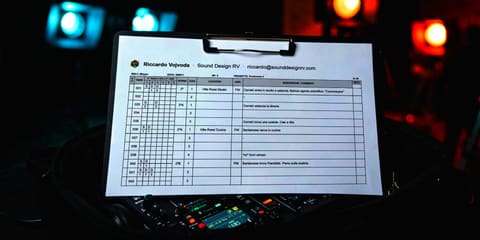
The sound report is the sheet where whoever records production sound notes, take by take, what was recorded: which scene, which slate, which microphone on which track, whether the take is good or no good, what happened. It travels with the audio files and is mostly for the people doing audio post-production, who without it have to listen to everything to find what they need.
What to deliver to the sound designer in general (the cut, the AAF, production sound) is in the guide on what to deliver. This one is only about the sound report.
What it contains
There is no single template: every sound mixer can build their own, adapted to the recorder and the kind of job, as long as the essential information is there. Mine, the one I use with my MixPre 6, has these columns:
- O/X: good or no good take;
- Take: the file number;
- Inputs: for each track, the microphone code and the number of the character it is assigned to;
- Scene and slate;
- Location;
- Shot: the code for the type of shot (close-up, medium shot, wide, over the shoulder);
- Description and comments;
- REC2: the file number on the second recorder, if there is one.
At the top of each page: recorder, date, episode, project and shooting day. At the end of the report, a legend with the microphone and shot codes and the numbered cast list, plus any other information that helps find your way around.
Sound report and continuity report
There is already a document on set that describes the shots: the continuity report, written by the script supervisor, which links each take to the camera numbering. The sound report doesn't replace it and doesn't have that link: it is a document meant for audio post-production. The editor can get information from it too, but won't find the camera take name there.
That's why the description has to make clear which shot the take refers to: the type of shot, any camera movement, the character in frame and the action. "Close on Anna, she walks into the kitchen" says a lot more than "take 2".
What it is for in post-production
The cut reaches audio with the AAF, which carries the clips that were used. The sound report helps when those aren't enough:
- a track is missing from the AAF, for example a radio mic;
- a take is noisy or has a problem and an alternative is needed for the same line;
- a gap has to be covered with room tone recorded in the same location from the same perspective;
- the wild tracks have to be found, the lines or sounds recorded for audio only, without camera.
With the sound report these searches take a few minutes. Without it, whole shooting days get listened to again.
The notes
The comments should hold everything the people in post can't know: a plane, a generator, traffic, a line re-recorded for audio only, room tone, a microphone that had problems, a track that changed name. Better one piece of information too many than one too few.
One habit I always keep: I don't repeat information on the next row if nothing has changed. The report stays easier to read, and the changes (a microphone moved, a new scene) stand out.
Who fills it in and when
Whoever records fills it in: the production sound mixer, the boom operator or an assistant, one row per take. It can be completed during breaks or at the end of the day, especially when working alone, when during takes the hands are busy with the boom pole and the recorder.
Paper or metadata in the files
Professional recorders can write scene, take, track names and notes inside the WAV files (iXML metadata), and some generate a sound report on their own: the larger Sound Devices recorders, the Zoom F8n Pro, the MixPre through the Wingman app. It is the most complete way, but it takes time during the shoot.
When I'm on my own I record, monitor and hold the boom at the same time: there is no time to enter metadata take by take, and the written report remains the quickest way. With a crew of at least a mixer and a boom operator, metadata becomes possible, and the report is still useful as an overview of the whole day.
How it is delivered
The sound report is delivered as a PDF, together with the day's files. Sample rate, frame rate and timecode matter mostly to the editor and already come with the files and the AAF, but writing them in the report too does no harm: the more information there is, the more professional the job.
A template to copy
The columns adapt to the job: a commercial needs fewer, a series needs more.
Header: recorder · date · episode · project · shooting day
Columns: O/X · take · inputs (microphone and character per track) · scene · slate · location · shot · description and comments · file on the second recorder
Legend: microphone codes · shot codes · numbered cast
For a production looking for a location sound mixer, or for production sound already recorded that needs to go through post-production, get in touch.
Sources
- iXML, metadata specification for production audio (ixml.info)
- EBU, Tech 3285, Broadcast Wave Format specification (tech.ebu.ch)
- Sound Devices, Sound Reports and the Wingman app (sounddevices.com)
- Zoom, F8n Pro manual, Create Sound Report (zoomcorp.com)